
Most forms get in the way. So I built one that gets out of it.
Why I built Formidable, a free, open-source form layer for Blazor: forms that wait until people are ready, let them save a draft, and keep every error where it belongs.
You've met this form.
You start typing your email address and it's already red. You haven't finished yet. You tick a box, a new section appears, and three messages you weren't expecting arrive with it. On the last step it asks for a document you don't have to hand, and it won't let you save. So you close the tab, find the document tomorrow, and start again from the top.
Nobody sets out to build that form. It happens because the tools make it the easy path.
The part nobody has time for
I design and build software for a living: customer portals, cloud platforms, the integrations that tie them together. Almost every one of those systems has forms somewhere at its heart, because forms are where people actually meet the software. And the important ones are complicated. Sections appear when you tick a box. Rows get added and removed. Some rules only the server can settle.
The tools give you fields and rules. What they leave to you is the part that decides when the form speaks up, which rules matter right now, and what happens when a check fails after someone presses submit.
On every project with forms like these, I built that layer by hand, slightly differently each time. It worked. It was never quite right, and it was never the priority, because the priority was delivering the system around it.
I care about the person on the other side of the form. So I built that layer properly, once, covered it with tests, and published it as an open-source library called Formidable. It's for Blazor, Microsoft's web framework and one of the stacks I work in. It's free, and it's already at work on a real client's forms.
What changes for the person filling it in
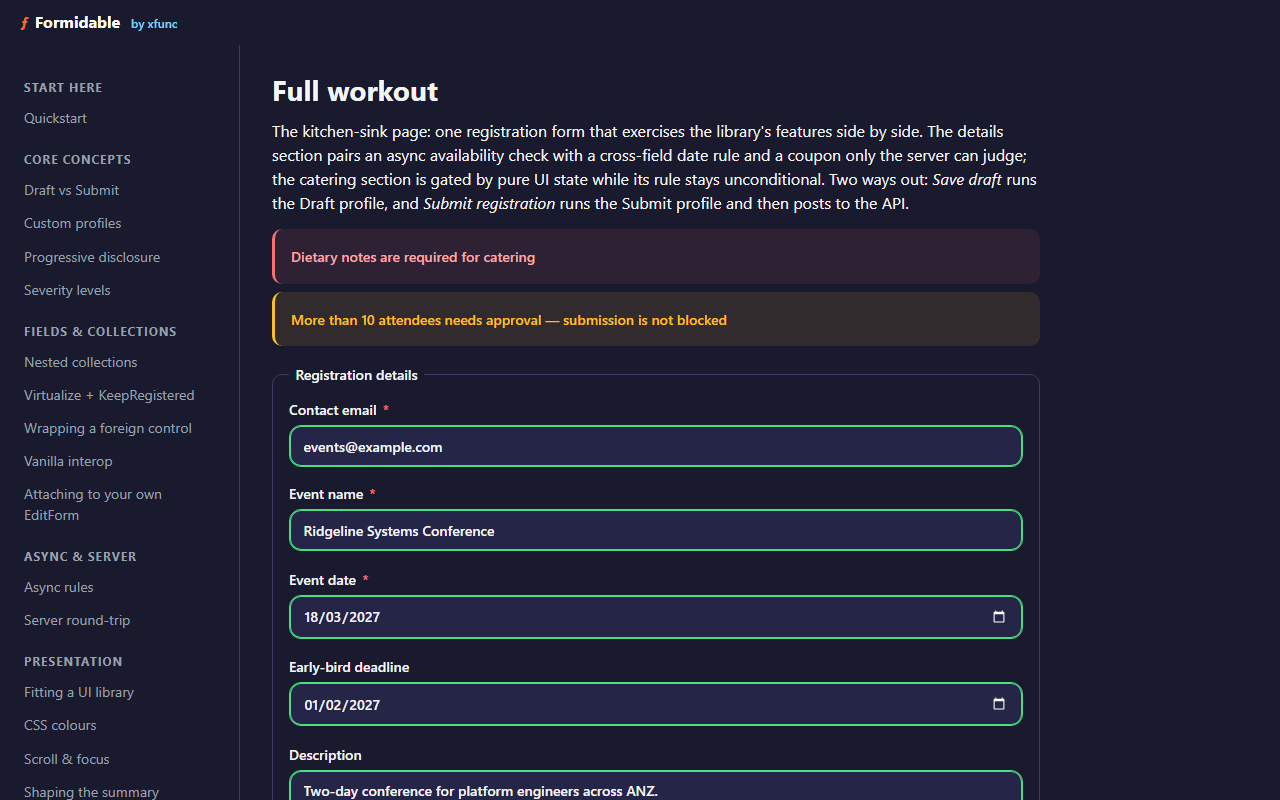
A submit that can't go through yet: what blocks it and what's only a warning, listed together at the top, with the fields that are already right marked green.
None of this is exotic. It's what you'd expect a form to do:
- A field nobody has touched stays quiet. Once someone has had a go at it, it says what would actually stop the save.
- Someone missing one document can save a draft and come back. The full checks run when they submit.
- At submit, one summary lists what needs fixing. If the only problems sit in a section that's hidden, the form says so instead of failing silently.
- The same rules run in the browser and again on the server, so a rejected save points at the exact field instead of a generic error.
- In a long list, rows can be added, removed or reordered, and every message stays with the row it belongs to.
The hard part was never knowing what good looks like. It was finding the time to build it, on every form, under every deadline.
Why give it away
Because the bad form isn't one team's problem. Plenty of teams building forms in Blazor meet the same gap and fill it by hand, the way I did. If Formidable saves one team from writing that layer again, and one person from starting a form from the top, it has done its job.
Building it once also means the teams I work with get the same behaviour on every form, without rebuilding it each time.
For developers
Formidable sits between Blazor's EditForm and FluentValidation. It's MIT-licensed, targets .NET 10, and your validators come across unchanged: a form is a handful of components around a model you already have.
dotnet add package Formidable.Blazor
The quickstart takes about five minutes. The sample app has one page per feature and runs live in the browser, and the tutorial grows a single signup form across six stages.
- See it running: xfunc-pty-ltd.github.io/formidable
- Quickstart and docs: github.com/xfunc-pty-ltd/formidable
- Tutorial: build a signup form step by step
Try it, and tell me where it falls short
Have a play with the demo. If it's useful, a star on GitHub helps other developers find it. And if a form built with it ever lets someone down, tell me. That's exactly what it's for.